


Langua: AI language learning
4.4132.00 Reviews
App Specs
- Version
- 2.2.0
- Updated On
- License
- Free
- Downloads
- 100,000+
- Developer
- LanguaTalk
- Categories
- Education
- Platform
- Android
Screenshots
 Analysis by AppCompare
Ever wanted to learn a new language but found yourself lost in a sea of grammar rules and vocabulary lists? Well, let me introduce you to Langua: AI language learning, your new best friend in the world of language acquisition. I recently took it for a spin and, spoiler alert, it’s pretty fantastic!
Why the first week feels inviting
For a beginner, the appeal is easy to understand: the idea of practicing a language through conversation feels less intimidating than opening a textbook and facing a page of rules. Langua is an education app from LanguaTalk, and its focus on speaking practice gives a new learner a practical reason to return after the first curious session. The app is free to download, with in-app purchases ranging from $19.90 to $199.90 per item, so it is worth checking what access costs before building a routine around paid options.
The first-week test I would set is simple: can you open it on an ordinary day and find a useful reason to speak, rather than just explore? Try a short practice session around a situation you expect to encounter, then note one correction or phrase you want to reuse. That small follow-up turns novelty into learning. If you only tap through a few sessions without revisiting anything, even a polished AI tutor can feel like entertainment rather than progress.
How Langua holds up as a language-learning habit
When I first opened Langua: AI language learning, the sleek and user-friendly interface stood out immediately. It's like the app just knows how to welcome you. No overwhelming menus or options, just a simple selection of languages to kickstart your journey. Whether you’re into Spanish, French, or even something less mainstream like Japanese, Langua has you covered.
Setting Up Your Learning Path
The app doesn’t just throw you into the deep end. Instead, it asks a few questions about your current level and goals. Want to travel, or are you learning for work? Langua tailors your experience accordingly. It was like having a personal tutor in my pocket, guiding me every step of the way.
That kind of setup is most useful when you treat it as a starting point, not a permanent label. A learner preparing for a trip might want to spend time on practical exchanges, while someone using the language at work may need to practice explaining an idea clearly. I’d revisit my own goal when my needs changed, because a plan that fit a holiday can become less relevant once I’m back to everyday study.
Interactive Lessons
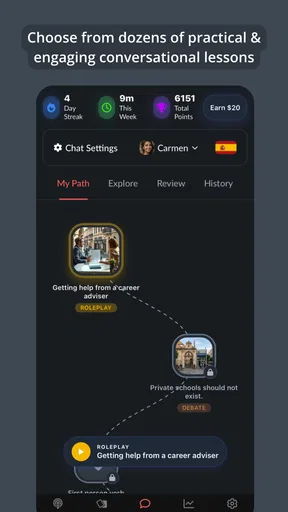
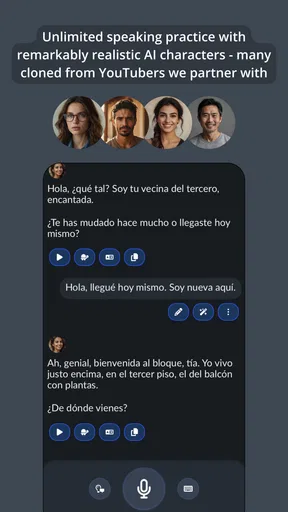
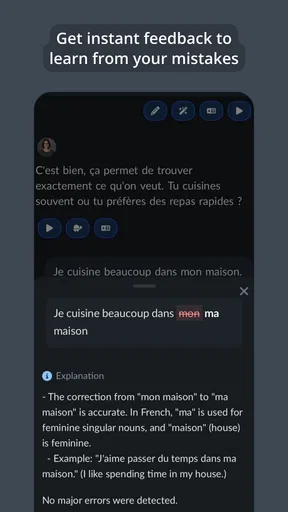
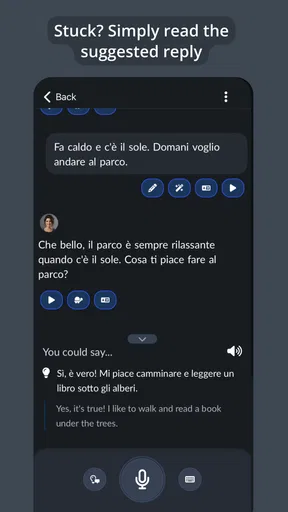
Now, let's talk about the lessons. They're not your typical boring drills. The app uses AI-powered techniques to make learning feel more like a game. Picture this: you’re in a virtual marketplace, trying to buy apples in Spanish. You speak into the app, and boom, instant feedback. It was both fun and incredibly effective.
Worth Reading Before You Choose

EA SPORTS FC Mobile 26 Is a Bigger Football Game, but It Takes Time

Flipboard Shows What News Apps Must Do Beyond the Feed

Switching to Android Auto Means Rethinking Your Driving Routine

Google Calendar Makes a Crowded Week Easier to Manage

Ludo King Makes the Most of the Minutes Between Plans

Baby Panda World Brings Quick Play to Modern Phones, but Its Game Library Feels Busy
The useful trade-off is that a conversational prompt gives you room to form your own answer, unlike a multiple-choice exercise where the choices do much of the work. But AI feedback should be treated as a practice aid, not an unquestionable authority. If a correction feels unclear, ask yourself what you were trying to say and try the sentence again in a simpler form. I would also keep a short personal note of recurring mistakes; noticing a pattern is more valuable than collecting isolated corrections.
Real-World Applications
One feature I absolutely loved was how Langua integrates real-life scenarios into its lessons. You get to practice ordering food, asking for directions, or even small talk. It’s these practical applications that really set it apart from other apps I’ve tried.
A realistic way to fit that into a busy day is to rehearse one upcoming interaction before it happens. If you are traveling, practice ordering a drink or asking where something is, then say the exchange aloud once without looking at the screen. For work, rehearse a brief introduction or a question you might need to ask. The point is not to memorize a perfect script; it is to get comfortable retrieving useful language when the conversation does not follow a neat lesson pattern.
This is where I see a difference from the usual language-app routine. Vocabulary and grammar exercises are useful for building knowledge, and structured courses can make a clearer path through fundamentals. Langua’s conversational approach is better suited to turning that knowledge into spoken responses. I would use it alongside a structured resource if I were starting from scratch or needed a systematic explanation of grammar, rather than expecting conversation practice alone to cover every learning need.
Progress Tracking
Let’s face it, motivation can be fleeting. But Langua’s progress tracker keeps you coming back for more. Watching those little bars fill up as you advance levels is strangely satisfying. Plus, it sends you friendly reminders, so you never miss your daily practice.
For month-to-month value, I would judge progress by whether I can say something more readily than I could a few weeks earlier, not only by a bar moving forward. Use the tracker as a nudge, then occasionally revisit a topic or scenario that once felt difficult. A reminder can help protect a habit, but it cannot decide whether the session is useful; if notifications start to feel like pressure, I’d turn the routine into a time that already exists in the day, such as a quiet break, instead of trying to answer every prompt immediately.
Keeping the routine manageable
Maintenance is the quiet test for any learning app. Langua is most likely to earn a lasting place if I keep sessions purposeful and modest: choose a situation, speak through it, and take away one phrase or correction. Trying to cover every available topic in one sitting can turn practice into a checklist. A rotating focus—travel one day, work or everyday conversation another—gives the sessions variety without making preparation feel like a second job.
There is also a useful boundary to set around the AI format. Conversation practice can build confidence, but it does not automatically replace listening to varied speakers, reading, writing, or talking with people. If my goal were an exam with a fixed syllabus, I would pair Langua with materials designed around that exam. If I needed reliable human nuance for an important professional exchange, I would seek a teacher or fluent conversation partner as well. The app’s strength is convenient practice, not a promise that one tool covers every form of fluency.
Community and Support
Langua also boasts a vibrant community. You can join forums, participate in language challenges, and even pair up with fellow learners for practice. It’s like having a global classroom at your fingertips. And if you ever get stuck, there’s a robust support system to help you out.
For a learner who enjoys talking with other people, that social angle can complement AI practice: a simulated exchange lets you try a phrase with less pressure, while a real partner can respond unpredictably and bring human perspective. I would not assume one replaces the other. Someone who prefers private, low-pressure rehearsal may get more value from the solo practice, while a learner who needs accountability or spontaneous back-and-forth should make sure the community side is actually part of their routine rather than counting on it to create a habit by itself.
The AI Edge
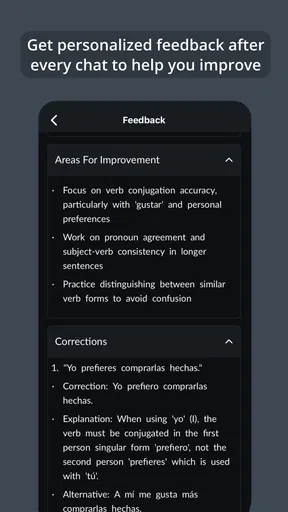
What really makes this app shine is its use of AI technology. It adapts to your learning style, offering personalized corrections and suggestions. It’s like the app gets smarter the more you use it, tailoring the experience to fit you like a glove.
My practical advice is to use that personalization actively: give answers that reflect what you would genuinely say, and do not simply repeat the sample wording. When a suggestion sounds unnatural for your purpose, compare it with the meaning you intended before adopting it. AI can make practice available at convenient moments, but its ease can also encourage passive acceptance. Speaking, checking, and then trying again is a more demanding workflow—and a more worthwhile one—than treating every generated response as a lesson to copy.
Who will keep using it—and who may not
I can see Langua working especially well for learners who already know some basics but freeze when they have to speak, people preparing for ordinary travel interactions, and anyone who wants a low-friction way to practice aloud between lessons. It is also a reasonable fit for someone who likes exploring different scenarios and can stay curious without needing a classroom schedule.
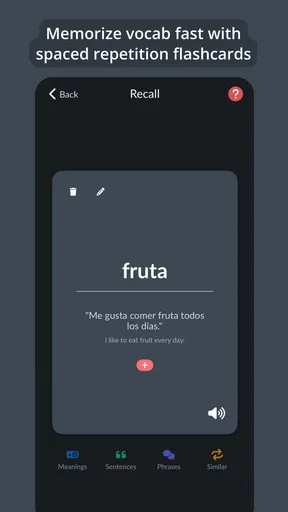
I would hesitate to recommend it as a standalone choice to someone who wants a carefully sequenced beginner course, prefers paper-based study, or needs a teacher to explain why a grammar form works. It may also be a poor match if speaking into an app feels awkward or if what you need most is extensive reading and writing. The best alternative depends on the gap: choose a structured course for orderly foundations, a human tutor for tailored explanations and conversation, or a flashcard tool for memorizing vocabulary. Langua is strongest when the missing piece is actually speaking practice.
Final Thoughts
All in all, Langua: AI language learning is a fantastic tool for anyone looking to pick up a new language or brush up on their skills. It’s intuitive, engaging, and incredibly effective. So, if you’re ready to embark on a linguistic adventure, Langua is definitely worth checking out.
Its standing in the catalog suggests that plenty of people have found it worth trying: it has a 4.6 average from around a thousand ratings, with over a hundred thousand installs. It is free to start, rated for Everyone 10+, and version 1.4.0 supports Android 7.0 and above. Those details make trying it an accessible decision, but they do not answer the personal question that matters more: does speaking practice fit the way you learn? I would give it a fair trial with a specific goal, then keep it only if I notice myself reaching for phrases more confidently beyond the app.
Ready to dive in and start speaking a new language with confidence? You can find the download links for both Android and iOS right here on our site. Trust me, your future multilingual self will thank you!
Pros
- Interactive lessons keep users engaged.
- Wide range of languages available to learn.
- AI-driven feedback enhances learning experience.
- User-friendly interface for easy navigation.
- Personalized learning paths for each user.
Cons
- Requires constant internet connection.
- Subscription cost may be high for some.
- Limited offline features available.
- Occasional app crashes reported by users.
- Some languages have limited content.
FAQs for Langua: AI language learning
What is Langua: AI language learning app?
Langua is an innovative app designed to enhance language learning through the use of AI technology. It offers personalized lessons, interactive exercises, and real-time feedback to help users improve their language skills effectively. The app supports multiple languages and caters to various proficiency levels, making it versatile for learners worldwide.
How does the AI technology in Langua work?
The AI in Langua analyzes your learning patterns and adapts the lessons accordingly to optimize your experience. It tracks your progress, identifies areas where you need improvement, and customizes exercises to suit your pace and proficiency. This ensures that your learning journey is as efficient and tailored as possible.
Is Langua suitable for beginners?
Absolutely, Langua is designed for learners of all levels, including beginners. It starts with basic vocabulary and simple sentence structures, gradually advancing as users become more comfortable. The app's intuitive interface and step-by-step guidance make it easy for beginners to start learning a new language confidently.
Does Langua require an internet connection?
While Langua offers offline access for many of its features, some functionalities, such as live conversation practice and real-time feedback, require an internet connection. Users can download lessons in advance to continue learning on the go without needing continuous internet access.
Are there any subscription fees for Langua?
Langua offers a free version with basic features, but to access advanced functionalities, users need to subscribe to a premium plan. The subscription provides additional benefits such as unlimited lessons, personalized coaching, and an ad-free experience. Various pricing plans are available to suit different budgets.


